
ParentSquare
ParentSquare: Communication & Student Payments
ParentSquare: Communication & Payments
ParentSquare is Galveston ISD’s communication and payment system. It keeps families informed through emergency and general school and district notifications by email, text, phone call, and app notifications. Parents can also use ParentSquare to conveniently pay student fees and fines.
ParentSquare automatically creates an account using the email address and phone number listed in Skyward. We encourage parents to download the ParentSquare app and customize their notification preferences so they receive information in the way that works best for them.
-
Beginning in August, new families that have enrolled for the 2026-27 school year will automatically start receiving email messages sent through ParentSquare. At this time, returning families will see their information (i.e. student grade & school) update in ParentSquare. Teacher/class information will not update until approximately a week before school starts.
Registering for ParentSquare allows parents/guardians to interact with messages (like and comment), receive app push notifications, text messages and more, although registration is not required to receive email communications. New families will receive an email in the beginning of August with instructions on how to register. -
- Receive messages via email, text, or app notification (general and emergency messages)
- Choose to receive information instantly or in a daily digest around 6pm
- Communicates in preferred language
- Direct message teachers and staff
- View school/classroom calendars and RSVP for events
-
You will soon receive an invitation email or text to join ParentSquare. Please click the link to activate your account. It takes less than a minute.
-
Use ParentSquare on any device. Download the free mobile app for iOS or Android, or visit Parentsquare.
Introduction to ParentSquare (English)
- ParentSquare Overview for Parents.
En español
- ParentSquare resumen para padres - español.
- ParentSquare Overview for Parents.
-
Student Fee Invoices Beginning Today
Student Fee Invoices in ParentSquare Pay
Dear GISD Parents and Guardians,
The GISD Finance Department will begin sending invoices through ParentSquare Pay for any outstanding student fees listed in your child's Skyward account.
To view and pay an invoice:
- Log in to ParentSquare (see link below.)
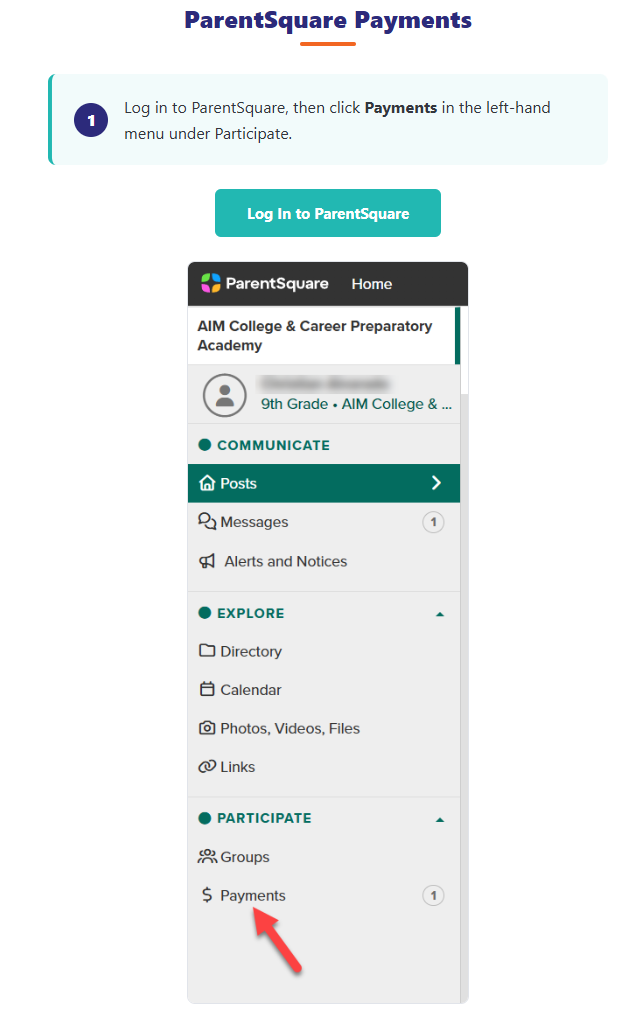
- Click Payments in the left-hand menu under Participate.
- Select the invoice to view the details and submit payment.
ParentSquare Pay also offers installment plans for larger outstanding balances. If you are interested in setting up an installment plan, please contact Lori Dochoda in the Finance Department at 409-766-5130 or lorrainedochoda@gisd.org.
Thank you!
